
Net worth tracker for Mac, iPhone and iPad.
Your checking account balance tells you what you have today. Your net worth tells you whether you are actually getting ahead. Banktivity is a complete net worth tracking app for Mac, iPhone and iPad that brings your accounts, investments, real estate, loans and other assets into one clear picture.
What Is Net Worth?
Everything you own, minus everything you owe.
Net worth is the sum of all your assets minus all your liabilities. Assets are things that have value: bank accounts, investment portfolios, retirement accounts, real estate, vehicles, precious metals, cryptocurrency. Liabilities are things you owe: a mortgage, a car loan, student loans, credit card balances. The difference between those two numbers is your net worth.
A positive net worth means you own more than you owe. A growing net worth means your financial decisions are working. Tracking it over time is how you know whether you are actually building wealth or just staying in place.
Why net worth matters more than your account balance
Your checking account balance can look healthy while your overall financial picture is deteriorating. If your debt is growing faster than your savings, for example, your balance may be fine but your net worth is declining. Net worth captures the full picture. It goes up when you pay down a loan, contribute to your retirement account or your home appreciates in value. It goes down when you take on new debt or a depreciating asset loses value. No single account balance can tell you any of that.

What Goes Into Your Net Worth
Every asset. Every liability. One number.
Banktivity pulls together everything that makes up your financial picture. Bank accounts, savings accounts and credit cards sync automatically. Investment accounts, retirement accounts and brokerage accounts contribute their current market value. Real estate, vehicles, precious metals, cryptocurrency and other assets can be added and updated whenever their value changes.
Loans, mortgages and other liabilities work the same way. Connect them and Banktivity tracks the remaining balance as you pay them down, automatically reducing what you owe in your net worth calculation.
Your home and your mortgage, linked together
For most people, their home is their largest asset and their mortgage is their largest liability. Banktivity lets you link your mortgage directly to your home asset in the sidebar. When collapsed, you see your net home equity — the difference between what your home is worth and what you still owe. Expand it and you see the gross home value and remaining mortgage balance separately. It is a simple but powerful way to see the most important number in your personal balance sheet at a glance.
Vehicles — an asset, but a depreciating one
You can add your vehicle to Banktivity as an asset, and if you have a car loan, add that as a liability. The honest thing to know about vehicles is that they lose value over time, sometimes quickly. Unlike a home, a car is almost never appreciating. Banktivity does not automatically update vehicle values, so it is worth revisiting every few months and updating the value to reflect current market conditions. Tools like Kelley Blue Book make this straightforward. Tracking your car and car loan together gives you a realistic sense of what that vehicle is actually contributing to your net worth.
Cryptocurrency, precious metals and other assets
Banktivity supports cryptocurrency tracking alongside your traditional accounts. Set up your crypto holdings as securities, enter your transactions, and Banktivity tracks performance and cost basis alongside the rest of your portfolio. Precious metals, additional real estate properties and other valuables can also be added. Anything you own that has value and belongs in your financial picture can have a place in Banktivity.



Organize Your Financial Picture Your Way
Group accounts the way you actually think about your money.
Banktivity lets you organize your accounts into custom groups and subgroups. If you own two properties, create a Real Estate group and put both homes inside it. Banktivity totals the group automatically so you can see your combined real estate value at a glance. Do the same for investment accounts, retirement accounts or any other category that makes sense to you.
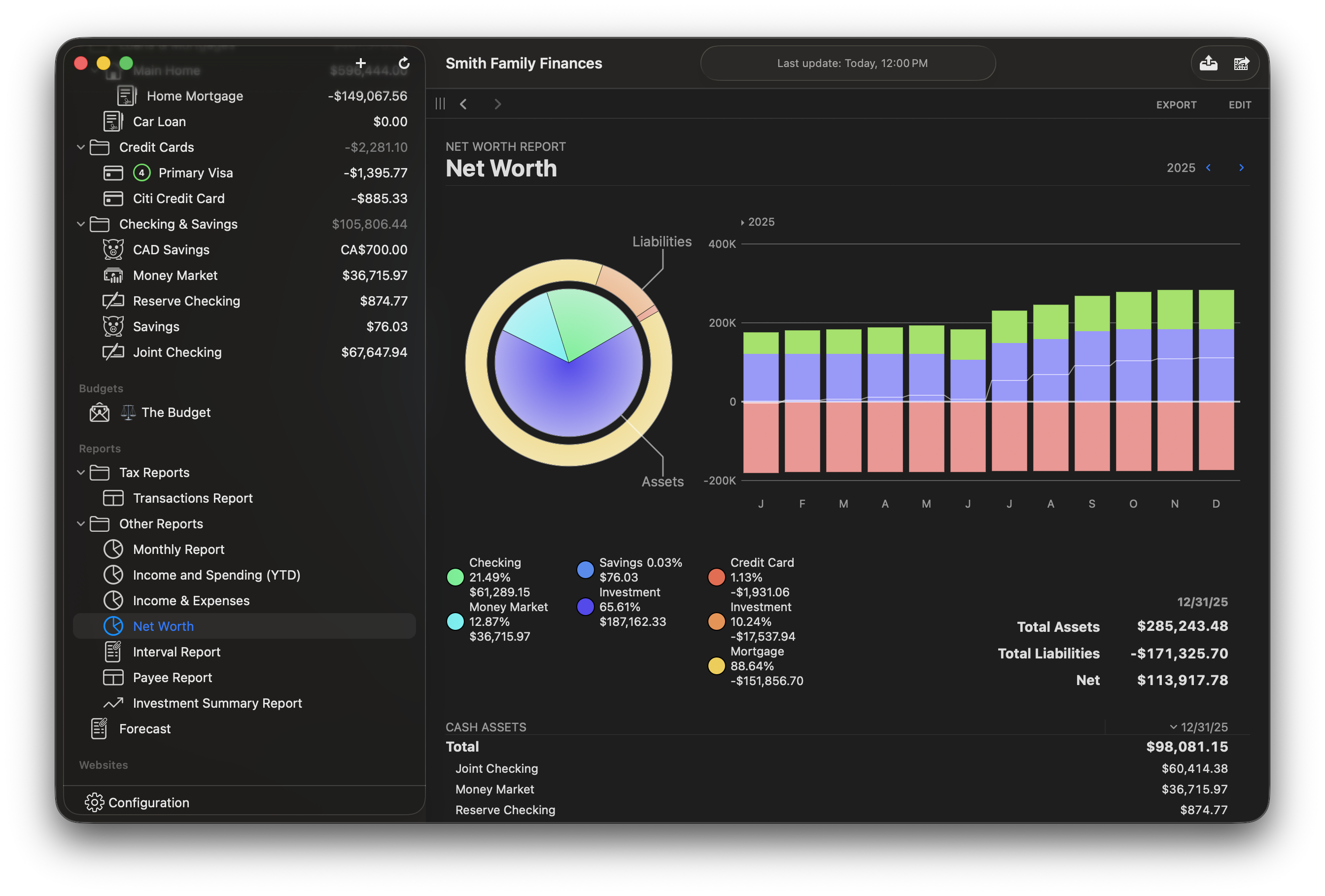
When your accounts are organized into groups, your net worth view becomes a structured balance sheet rather than a long flat list. You can see how much of your net worth comes from real estate, how much from investments, how much from cash and how much your total liabilities are pulling it down.
As many groups and subgroups as you need
There is no limit to how you structure your accounts. A simple setup might have Checking, Savings, Investments and Mortgage. A more complex one might have multiple real estate properties each linked to their own mortgage, retirement accounts grouped separately from taxable brokerage accounts, and a vehicle with its loan grouped together. Banktivity handles both with the same clean sidebar view.


Track the Trend, Not Just Today
The direction matters as much as the number.
A single net worth number tells you where you stand today. A net worth chart over time tells you whether your financial decisions are working. Banktivity tracks your net worth history and displays it as a report you can view by month, by year or across your full financial history.
On Mac, Banktivity also shows your savings rate — the percentage of your income you are actually setting aside. Net worth and savings rate together give you the two most important indicators of long-term financial health: where you are and how fast you are getting to where you want to be.
Savings rate on Mac
Savings rate is one of the most powerful financial metrics most people never track. If your net worth is growing, your savings rate tells you how fast. If your net worth is flat or declining, your savings rate tells you why. Banktivity surfaces your savings rate on Mac alongside your net worth so you have both numbers without running a separate report.
Net worth as a goal check
If you have set a retirement goal in Banktivity, your net worth tracking feeds directly into it. The retirement planner uses your actual account balances to show whether your current trajectory gets you to your target. Your net worth is not just a number to admire. It is the input that makes your long-term planning accurate.


Connected to Your Complete Financial Picture
Net worth is more useful when it is connected to everything else.
A standalone net worth tracker shows you a number. Banktivity connects that number to your budget, your investment portfolio and your long-term goals so you can see not just what your net worth is, but what is driving it and where it is headed.
Your investment accounts contribute to your net worth automatically. Your mortgage balance reduces it as you make payments. Your budget decisions affect how much you can save each month, which determines how fast your net worth grows. Your retirement planning is built on the trajectory of your net worth over time. Because everything lives in the same app, you can see how each financial decision affects the bigger picture.
For the full picture of what Banktivity offers, see our personal finance software for Mac overview, or learn more about our personal finance app for iPhone and iPad.

Frequently Asked Questions
What is net worth and why does it matter?
Net worth is the total value of everything you own minus everything you owe. It matters because it is the most honest measure of financial progress. Your account balance can look healthy while your debt is growing. Net worth captures the full picture — assets and liabilities together — so you can see whether you are actually building wealth over time.
What should a good net worth tracker show?
A good net worth tracker should show more than a single number. It should connect your bank accounts, investments, retirement accounts, real estate, loans and other assets into one complete financial picture. Banktivity does this across Mac, iPhone and iPad, letting you track how your wealth changes over time instead of only showing today's balances.
How does Banktivity calculate net worth?
Banktivity adds up the current balances of all your asset accounts — bank accounts, investment accounts, real estate and other assets — and subtracts all your liability balances including mortgages, loans and credit card balances. Accounts that sync automatically update continuously. Manual assets like real estate and vehicles update when you enter a new value.
Can I add assets that don't have a bank account, like a house or a car?
Yes. Banktivity supports manual assets including real estate, vehicles, precious metals, cryptocurrency and other valuables. You enter the current value and update it as it changes. For real estate, you can link your mortgage directly to the property so you see net home equity in one view. For vehicles, updating the value every few months gives you an accurate picture of how depreciation is affecting your net worth.
Can I link my mortgage to my home in Banktivity?
Yes. When you link a mortgage to a real estate asset in Banktivity, the sidebar shows your net home equity when collapsed — the difference between your home value and remaining mortgage balance. Expand it and you see both figures separately. It is the clearest way to see what your home is actually contributing to your net worth after accounting for what you still owe.
Should I include my car in my net worth?
Yes, but with realistic expectations. A vehicle is an asset and belongs in your net worth calculation, but unlike real estate, vehicles almost always depreciate over time. Banktivity lets you add your vehicle and your car loan as separate accounts. Because the value changes over time, it is worth updating the vehicle value every few months using a tool like Kelley Blue Book to keep your net worth accurate.
Can I track cryptocurrency in Banktivity?
Yes. Banktivity supports cryptocurrency tracking. Set up your crypto holdings as securities, enter your transactions, and Banktivity tracks performance and cost basis alongside the rest of your portfolio and net worth.
Does Banktivity track net worth on iPhone and iPad?
Yes. The net worth report is available on Mac, iPhone and iPad with end-to-end encrypted sync keeping all three in step. Check your net worth from any device and the number is always current.
What is savings rate and does Banktivity show it?
Savings rate is the percentage of your income you are setting aside rather than spending. It is one of the most direct indicators of how fast your net worth will grow. Banktivity shows your savings rate on Mac alongside your net worth data.
Is net worth tracking available on all Banktivity plans?
The net worth report is available on all plans including Bronze. Investment accounts, real estate and mortgage tracking require Silver or Gold, since those account types are part of the higher tiers.
Can I organize my accounts into groups in Banktivity?
Yes. Banktivity lets you create custom account groups and subgroups. If you own multiple properties, group them under Real Estate and Banktivity totals the group automatically. You can structure your accounts any way that makes sense to you — by account type, by owner, by institution or any other grouping — and the net worth view reflects that structure.