
The best personal finance app for iPhone and iPad.
Most finance apps treat iPhone and iPad as an afterthought. Banktivity is different — built natively for iOS and iPadOS with full budgeting, investment tracking, reports, reconciliation and more. Everything your Mac app does, in your pocket and on your lap.
Not a Companion App
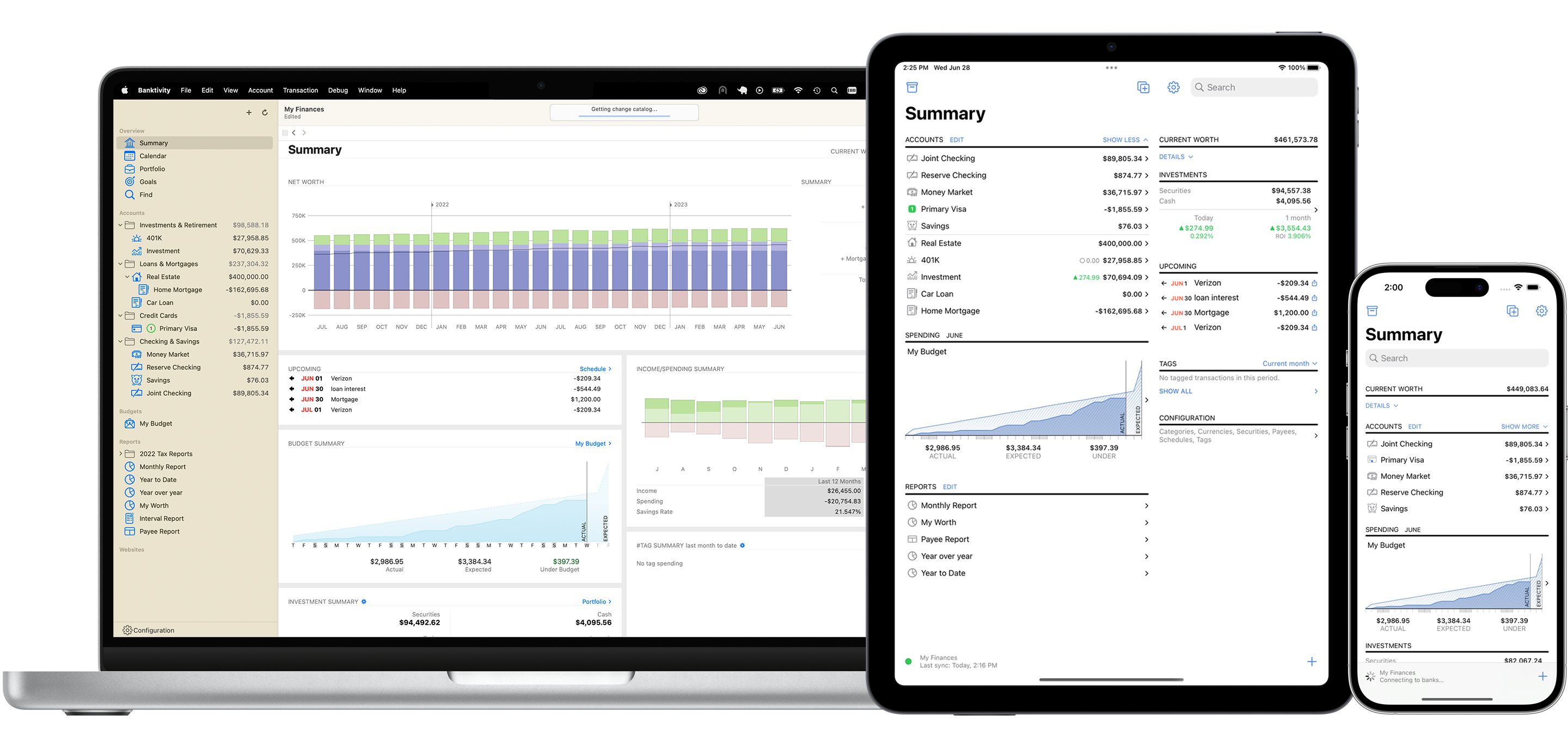
The full app. On your iPhone and iPad.
A companion app is what happens when mobile is an afterthought. A dashboard, maybe transaction entry, and a prompt to open the real app for anything serious. Banktivity is built differently. Each version is designed specifically for its platform. The Mac app leverages the large screen and keyboard shortcuts. The iPad app is built for touch with iPad-native layouts. The iPhone app puts your complete financial picture in your pocket. Same data, same features, each optimized for the device in your hand.
On iPhone you can reconcile accounts, run reports, check investments, manage your budget, enter split transactions and view net worth. Without touching your Mac.
Manage completely separate sets of books
Banktivity supports multiple independent ledgers — so you can track your family finances, a family member's accounts, a nonprofit and a small business all from the same app, with zero data commingling between them. Switch between ledgers with a tap. Each one has its own accounts, budget, reports and history, completely isolated from the others. It is the kind of capability that used to require separate software for each entity.
What you get on iPhone and iPad
- Full budgeting — envelope and category-based
- Investment portfolio tracking and drill-down
- Net worth reports and tracking
- Account reconciliation and statement creation
- Powerful report types including income and expense, net worth, payee and forecast
- Multi-currency support with live exchange rates
- Bank sync and manual transaction entry
- Multiple independent ledgers — manage family, business and nonprofit finances separately
- End-to-end encrypted sync with your Mac
Good to know
- iOS and iPadOS only — no Android version
- A small number of advanced reports are Mac-only
- Subscription starts at $59.99/year — covers Mac, iPhone and iPad
- 30-day free trial


Built for iPad — Not Just Running on It
The big screen deserves a real app.
Most finance apps on iPad are just iPhone apps scaled up. Same layout, same features, just bigger. Banktivity is different. The iPad app is designed for the larger screen with layouts and workflows that use the space rather than just fill it.
Banktivity on iPad supports multiple scenes. Open your budget in one window and your account register in another, side by side. The kind of multi-window financial workflow that used to require a Mac. Now on your iPad.
Multiple scenes — a genuinely iPad-native feature
iPadOS supports opening the same app in multiple windows simultaneously — and Banktivity is built to take advantage of it. Open your budget in one scene and your transactions in another. Keep your net worth view running while you reconcile a different account. Banktivity offers a level of multi-window flexibility that is rare among personal finance apps on iPad. It is the closest thing to a dual-monitor financial workstation you can have without a Mac.
Full reports on the big screen
Income and expense reports, net worth over time, investment summaries, payee breakdowns — a powerful subset of Banktivity's reports run on iPad with the same customization and depth as the Mac. Filter by date, account, category and payee. Drill from a high-level summary down to the transaction that explains a number.


Budgeting on the Go
Check your envelope before you spend — right from your iPhone.
The whole point of envelope budgeting is knowing what you can spend before you spend it. That only works if your budget is always current and always accessible. Banktivity's iPhone app gives you full access to your envelopes in real time — so whether you're at the store, planning a purchase or just curious where you stand, the answer is in your pocket. Your budget travels with you because your iPhone does.


Investment Tracking on iPhone and iPad
Your full portfolio — in your pocket.
Most finance apps show you investment account balances on mobile. Banktivity shows you what is inside those accounts — individual securities, portfolio performance, per-account drill-down, price history and position details — all from your iPhone and iPad. The same depth of investment tracking available on Mac is available on your phone.


Reports on iPhone and iPad
Real reports. Not just charts.
A spending pie chart is not a report. Banktivity's iPhone and iPad apps give you the same reporting depth as the Mac — income and expense, net worth over time, payee breakdowns, investment summaries and more. Filter by date range, account and category and compare different periods. Drill-in from a summary number down to the individual transaction behind it.


One App. Every Apple Device.
Everything in sync — automatically and securely.
Banktivity uses end-to-end encrypted cloud sync to keep your Mac, iPhone and iPad in step automatically. Every transaction you enter on iPhone appears on your Mac. Every report you run on iPad reflects the same data as your desktop. Your financial picture is always current on every device you own — and because the sync is end-to-end encrypted, not even Banktivity can see your data.
Banktivity is personal finance software for Mac that extends fully and natively to iPhone and iPad. One subscription. One set of data. Every Apple device covered.
Local data storage — your data stays on your devices
Unlike web-based finance apps where your complete financial history lives on someone else's servers, Banktivity stores your data locally on your devices. The encrypted sync exists to keep your devices in step — not to give a third party access to your financial life. You are not dependent on Banktivity's servers being up to access your own data.
Works offline
No internet connection? No problem. Banktivity's iPhone and iPad apps work fully offline — enter transactions, check your budget, review reports. Everything syncs the next time you have a connection. For a web app, offline is impossible. For Banktivity, it is the default.

How Banktivity Compares on Mobile
Most iPhone finance apps are missing something. Banktivity isn't.
Copilot Money has great iPhone design but limited investment tracking and no retirement planning. Monarch is a web app — the iPhone experience is better than the browser but the product was built for the web first. YNAB has no investment tracking at all. Quicken's iOS app is a companion, not a full app.
Few personal finance apps for iPhone and iPad go as deep as Banktivity: native Apple design, investment tracking, envelope budgeting, retirement planning, multi-currency support, account reconciliation, local data storage and a full-featured Mac app in one system.
Coming from Quicken?
Quicken's iOS app is a companion — designed to let you check balances and enter transactions while you wait for the real work to happen on your desktop. Reconciliation, reporting, investment tracking and goal planning all require the Mac or Windows app. Banktivity's iPhone and iPad apps handle all of that natively. If you've been frustrated by Quicken's mobile limitations, Banktivity was built to solve exactly that problem. See our full Quicken alternative comparison.
Coming from Monarch?
Monarch's iPhone app is good, but Monarch is fundamentally a web product. On iPhone you're using a mobile app built on top of a web-first architecture. Banktivity's iPhone app is native through and through — and it pairs with a native Mac app rather than a browser tab. See our full Monarch alternative comparison.

What Our Customers Say
Real customers who use Banktivity every day.
From tracking spending to planning for retirement — Banktivity users chose the app built specifically for iPhone and iPad.
“Best. Financial. Software. Ever. (And I've used MANY!) If you really want financial software that's both easy to use and powerful, this is the one. I love how it syncs across devices and from my bank accounts.”
– Raymond, Ontario, Canada
“Managing cash-flow was a challenge. Now decision making on spending is so much simpler and objective. I can plan my life for fun and my responsibilities proactively.”
– Craig, Washington, DC
“Banktivity is intuitive and easy to use. It gives me peace of mind and keeps all my money-related information in one place.”
– Debbie, Texas
“All it takes us is a 15-minute monthly session to review all transactions. Love being able to know at any moment what our expenditures are and what our cash-flow need is.”
– Philip, Florida
“Simple, effective and efficient money management - doing the accounts is now a pleasure not a chore!”
– R.A.B., United Kingdom
“I was disappointed that there was no banking software that was up to the standard of the normal Mac software... when I came across iBank (now Banktivity). I have been sold ever since!”
– B.W., Oregon
Frequently Asked Questions
Is Banktivity a full app on iPhone or just a companion?
Banktivity is a full app on iPhone — not a companion. You can manage your budget, track investments, run reports, reconcile accounts, enter transactions and check your net worth entirely from your iPhone without ever touching your Mac. A small number of advanced report types are Mac-only, but the vast majority of Banktivity's features are fully available on iPhone.
What makes Banktivity different on iPad?
Banktivity on iPad is designed for the larger screen — not just an iPhone app scaled up. It supports multiple scenes, meaning you can open your budget in one window and your account register in another side by side. Full reports, investment tracking, reconciliation and multi-currency support are all available on iPad with layouts built for the larger display.
Does Banktivity track investments on iPhone?
Yes. Banktivity shows your full investment portfolio on iPhone — individual securities, per-account performance, price history and position details. The Investment Performance Widget also lets you see how a chosen account is performing directly from your iPhone home screen without opening the app.
Can I run reports on iPhone and iPad?
Yes. Banktivity's full reporting suite is available on iPhone and iPad — income and expense, net worth, payee, investment summary and more. Filter by date, account and category. Export to PDF or CSV directly from your device.
Can I compare spending across different time periods on iPhone?
Yes. Banktivity's reports on iPhone and iPad let you compare any period against a previous one — this month vs last month, this year vs last year, and other ranges. It is the kind of reporting depth that most desktop apps don't even offer, but on your iPhone and iPad.
Can I manage finances for more than one person or entity in Banktivity?
Yes. Banktivity supports multiple independent ledgers — completely separate sets of accounts, budgets and reports for different people or entities. Your family finances, a family member's accounts, a small business and a nonprofit can all live in the same app with no data shared between them. Switch between ledgers from iPhone or iPad with a tap.
How does Banktivity sync between my iPhone, iPad and Mac?
Banktivity uses end-to-end encrypted cloud sync to keep all your devices in step automatically. Every transaction, account balance and report reflects the same data across your Mac, iPhone and iPad. The sync is encrypted end-to-end — Banktivity cannot read your data in transit or at rest.
Does Banktivity work offline on iPhone?
Yes. Banktivity works fully offline on iPhone and iPad. Enter transactions, check your budget, review reports — everything works without an internet connection. Your data syncs automatically the next time you connect.
Does Banktivity support multiple currencies on iPhone?
Yes. Banktivity supports 30+ currencies with automatic exchange rate downloads on iPhone and iPad — the same multi-currency support available on Mac.
Is there a separate cost for the iPhone and iPad apps?
No. A single Banktivity subscription covers Mac, iPhone and iPad. One subscription, every Apple device you own.
Can I try Banktivity before paying?
Yes. Banktivity offers a 30-day free trial with no credit card required. Download it, connect your accounts and explore everything — on Mac, iPhone and iPad — before you decide.